
JavaScript Objects Explained for Beginners (With Simple Examples)
Understanding the Basics
In the world of computer programming, there is a term that you will often come across: 'object'. So, what is an object in JavaScript? In simple terms, an object is a collection of related data and/or functionality which is composed of variables and functions.
An object is a key-value pair data structure in JavaScript.
It is unorder collection of key-value pairs or properties.
We can have Distict key in object, each mapped with a value that can be any data type in JavaScript.
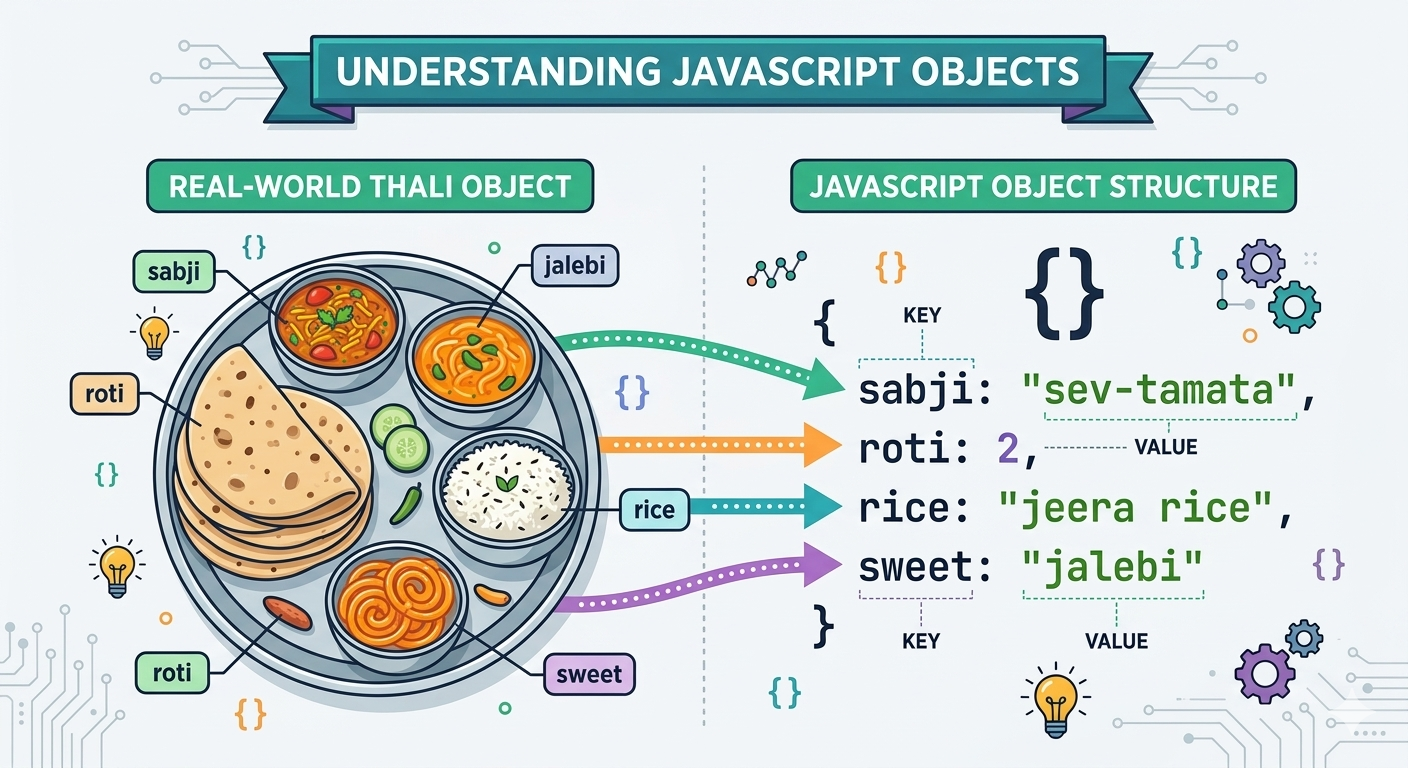
real-world analogy of an object
Imagine you are trying to describe a Gujarati Special Thali to a non gujju. How would you do it?
You would probably start by describing what’s inside it — how many rotlis(Chapati) it has, what type of shaak(Sabji ), whether there is dal and rice, if chaas(Buttermilk) is included, and what sweet is served.
In JavaScript, these characteristics are known as properties.
Now think about what you can do with that thali. You can eat it, refill the dal, ask for extra chaas, mix the rice with dal, or even pack the remaining food.
These actions are what we call methods in JavaScript.
In this analogy, the thali is the object.
The food items inside it are the properties, and the actions you can perform with it are the methods. If you are confused about methods then u can say that a method is a function in programming.
Creating an object in JS
const Thali = {
    Sabji: "sev-tamata",
    roti: 2,
    Sweet: "jalebi",
    rice: "jeera rice",
    dal: 'dal fried',
    eat: function () {
        console.log("eating thali.....");
    }
};
const x = 'rice';
In this example Thali is Object and sabji, roti, Sweet.. are the properties of thali. eat is a function or we can say method of the thali.A property is simply a characteristic, a trait, of an object.The value on the otherhand simply specifies the value associated with this key.
Accessing Object Properties and Methods
console.log(Thali.Sabji); //sev-tamata

console.log(Thali['roti']);//O/P=2(can also access like this)

console.log(Thali.eat);//[Function: eat]

console.log(Thali.eat());//eating thali......
                        // null
console.log(x);// rice
here is the example that how can we access the object properties.
here we can do return "eating thali......" so that s give output = "eating thali"
but here we have use console.log so that it give undefined as return value thats why we take null as a return type.
Objects are Mutable
Mutable means changeable.Once we create a Object then we can change the properties.here is how we can change.
Thali.Sabji = "dahi-Bhindi"; //using dot notaion
console.log(Thali.Sabji);//dahi-Bhindi
we can also add new properties in object after creation;
Thali['drink'] = "chaas";// using bracket notation
console.log(Thali.drink);//chaas
The Object() constructor
When invoked without an argument, Object() returns an empty object, similar to {}, as shown below:
var point = new Object();

console.log(point);
{}
Difference between {} and new Object()
Semantically (in terms of meaning), there is no difference between {} and Object().
But obviously, syntactically there is a difference — in fact, a big difference.
{} is shorter and doesn't involve a function invocation. On the contrary, new Object() is longer and involves a function invocation (and is, likewise, relatively slightly slower than {}).
In short, new Object() is not elegant and concise at all. Well, it's not even needed in any case!
There is absolutely no single reason to use new Object() in place of {} in code. It's not possible to create a new object in one single line solely using new Object().
To do so, we only have one option and that is to provide the object as a literal into the Object() constructor, which could just be simplified to using the literal directly (without passing it to new Object()).
passing by reference
var point = { x: 0, y: 0 };
var point2 = point;

point2.x = 10; // update point2's x property to 10

console.log(point.x);
console.log(point2.x);
10
10
Conclusion
Objects are one of the most important concepts in JavaScript because they allow us to store related information together in a structured way.


