
JavaScript Promises Explained for Beginners
What Problem Do Promises Solve? What Is a Promise in JavaScript? Promise States: Pending, Fulfilled, Rejected Promise Lifecycle Step by Step Creating Your First Promise Handling Success with .then() Handling Errors with .catch() Promise Chaining Callback vs Promise Common Beginner Mistakes Quick Revision Cheatsheet

If you are learning JavaScript, sooner or later you will meet this word:
Promise
And honestly, at first, it sounds more confusing than it actually is.
You may see code like this:
fetch("https://api.example.com/users")
  .then((response) => response.json())
  .then((data) => console.log(data))
  .catch((error) => console.log(error));
And your brain may go:
“What is this
.then()? Why is data coming later? Why not just return the value directly?”
Totally normal.
Promises exist because JavaScript often has to do work that takes time. For example, calling an API, waiting for a timer, reading a file, or loading data from a database.
JavaScript does not stop the whole program and wait. Instead, it says:
“I’ll continue running other code. When this async work finishes, I’ll inform you.”
That future result is handled using a Promise.
A simple way to say it:
“Abhi result ready nahi hai, pan baad ma malse.”
Or even simpler:
A Promise is a container for a value you will get in the future.
Why Do Promises Exist?
JavaScript is often used for tasks that do not finish immediately.
For example:
Waiting for a timer
Fetching data from a server
Reading a file
Checking login details
Loading products in an e-commerce app
Earlier, JavaScript commonly used callbacks for async code.
Example:
setTimeout(() => {
  console.log("chai is ready");
}, 3000);
This is fine for one task.
But imagine many async steps:
getUser(() => {
  getOrders(() => {
    getPayment(() => {
      sendEmail(() => {
        console.log("Done");
      });
    });
  });
});
This becomes hard to read.
This nesting is often called callback hell.
It looks like code is going deeper and deeper, like stairs going into a basement.
Promises were introduced to make async code more readable and manageable.
What Is a Promise?
A Promise is an object that represents the future result of an asynchronous operation.
Simple definition:
A Promise is a JavaScript object that says: “I don’t have the result right now, but I promise i will either give you the result later or tell you something went wrong.”
Think of ordering food at a college canteen.
You pay for samosa and get a token.
At that moment, you do not have the samosa yet.
But the token represents a future result.
Later:
If samosa is ready, you get it.
If samosa is finished, they tell you it is not available.
That token is like a Promise.
In JavaScript:
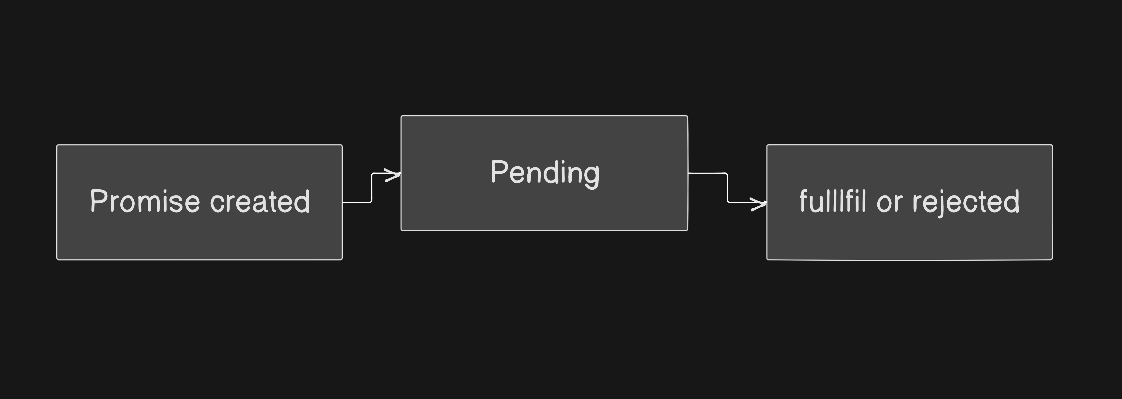
Promise States
A Promise can be in one of three states.
1. Pending
pending means the async task is still running.
Example:
Timer is still counting
API request is still loading
File is still being read

At this point, JavaScript does not know if the task will succeed or fail.
2. Fulfilled
fulfilled means the async task completed successfully.
Example:
API returned data
Timer finished
File was found
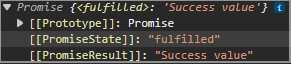
This happens when we call:
resolve("Success value");
3. Rejected
rejected means the async task failed.
Example:
Network error
File not found
Server crashed
Invalid data

This happens when we call:
reject("Failure reason");
Promise Lifecycle Diagram
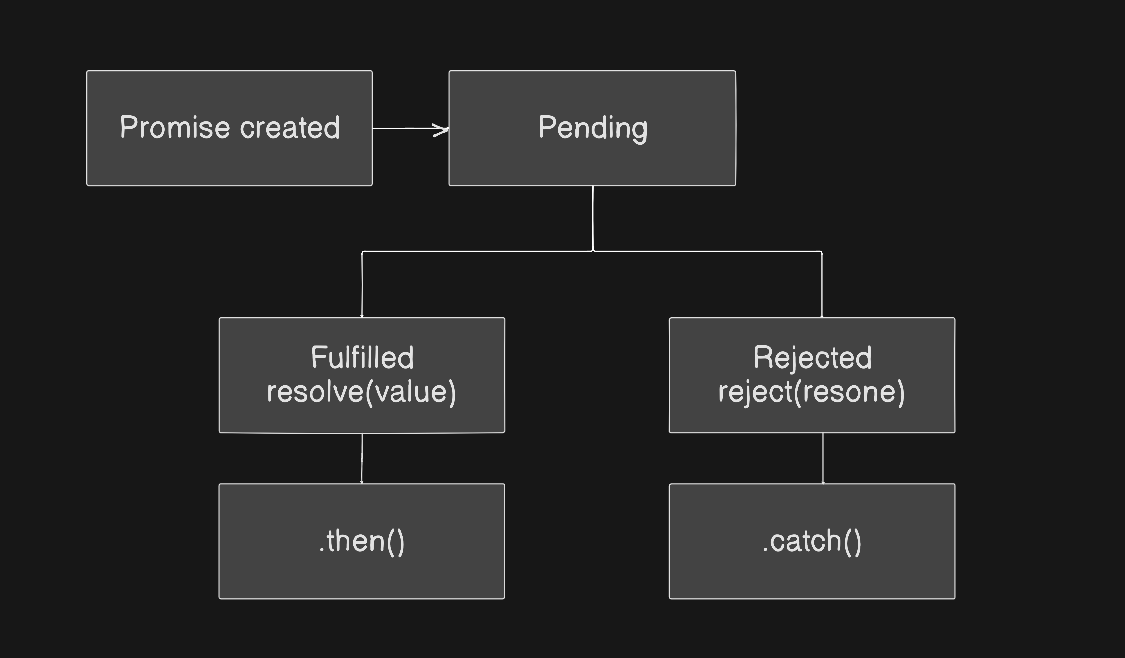
This is the basic promise journey.
A promise starts as pending.
Then it becomes either fulfilled or rejected.
Once a promise is fulfilled or rejected, it is called settled.
Creating a Promise
We create a promise using new Promise().
const myPromise = new Promise((resolve, reject) => {
  // async work here
});
The function inside new Promise() is called the executor function.
It receives two functions:
resolve
reject
Use resolve() when the task succeeds.
Use reject() when the task fails.
Important: Executor Runs Immediately
This is one point beginners often miss.
The executor function runs immediately when the promise is created.
Example:
console.log("1");

new Promise((resolve, reject) => {
  console.log("2");
});

console.log("3");
Output:

Why?
Because the executor runs right away.
The Promise itself does not delay the code.
Only the async operation inside it may take time.
First Promise Example
Let’s create a simple timer promise.
const teaPromise = new Promise((resolve, reject) => {
  setTimeout(() => {
    resolve("chai is ready");
  }, 3000);
});
What is happening here?
Promise is created.
It starts in
pendingstate.setTimeout()waits for 3 seconds.After 3 seconds,
resolve("Tea is ready")runs.Promise becomes
fulfilled.
But how do we get the value?
Using .then().
Handling Success with .then()
.then() is used to run code after a promise is fulfilled.
teaPromise.then((message) => {
  console.log(message);
});
Full example:
const teaPromise = new Promise((resolve, reject) => {
  setTimeout(() => {
    resolve("Tea is ready");
  }, 3000);
});

teaPromise.then((message) => {
  console.log(message);
});
Output after 3 seconds:
Tea is ready
Think of .then() like saying:
“When the promise succeeds, then run this function.”
In simple Hinglish:
“Promise pura ho jaye, then ye kaam kar dena.”
Promise Value
A promise does not only have a state.
It can also carry a value.
When we call:
resolve("Tea is ready");
"Tea is ready" becomes the success value.
When we call:
reject("Milk is finished");
"Milk is finished" becomes the failure reason.
So internally, a promise tracks two important things:
State  → pending / fulfilled / rejected
Value  → success result or failure reason
Simple mental model:
Promise = {
  state: "pending",
  value: undefined
}
After success:
Promise = {
  state: "fulfilled",
  value: "Tea is ready"
}
After failure:
Promise = {
  state: "rejected",
  value: "Milk is finished"
}
This is not exact JavaScript code, but it helps build the mental model.
Handling Failure with .catch()
Async work can fail.
Maybe the server is down.
Maybe the internet is not working.
Maybe the data is invalid.
So we need error handling.
For failure, we use .catch().
const foodPromise = new Promise((resolve, reject) => {
  setTimeout(() => {
    reject("Samosa is not available");
  }, 2000);
});

foodPromise
  .then((message) => {
    console.log(message);
  })
  .catch((error) => {
    console.log("Error:", error);
  });
Output after 2 seconds:
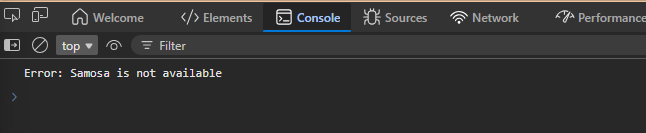
.catch() means:
“If something goes wrong, handle it here.”
Success and Failure Together
Let’s make a more real-world example.
const isPaymentSuccessful = true;

const paymentPromise = new Promise((resolve, reject) => {
  setTimeout(() => {
    if (isPaymentSuccessful) {
      resolve("Payment completed");
    } else {
      reject("Payment failed");
    }
  }, 2000);
});

paymentPromise
  .then((message) => {
    console.log(message);
  })
  .catch((error) => {
    console.log(error);
  });
If isPaymentSuccessful is true, output:
Payment completed
If it is false, output:
Payment failed
One Important Internal Rule
Even if a promise is already resolved, .then() does not run immediately.
Look at this:
const promise = new Promise((resolve, reject) => {
  resolve("Hello");
});

promise.then((value) => {
  console.log(value);
});

console.log("Bye");
Output:
Bye
Hello
At first, this feels strange.
The promise is already resolved, so why does "Bye" print first?
Because promise callbacks like .then() and .catch() run asynchronously after the current synchronous code finishes.
Important line to remember:
Promise executor runs immediately, but
.then()runs later.
Visual flow:
console.log("Bye") runs first
        ↓
current sync code finishes
        ↓
.then() callback runs
        ↓
"Hello" prints
Callback vs Promise
Before promises, async code often looked like this:
getUser(function (user) {
  getPosts(user, function (posts) {
    getComments(posts, function (comments) {
      console.log(comments);
    });
  });
});
This works, but it becomes nested.
With promises:
getUser()
  .then((user) => getPosts(user))
  .then((posts) => getComments(posts))
  .then((comments) => {
    console.log(comments);
  })
  .catch((error) => {
    console.log(error);
  });
Cleaner, right?
Callback vs Promise Comparison
| Feature | Callback | Promise |
|---|---|---|
| Readability | Can become messy | Cleaner chain |
| Error handling | Spread across callbacks | One .catch() can handle errors |
| Flow | Nested | Step-by-step |
| Future value | Not represented clearly | Promise represents future result |
| Maintainability | Hard in large code | Easier to manage |
Visual comparison:
Callback style:

getUser
  └── getPosts
        └── getComments
              └── display


Promise style:

getUser
   ↓
getPosts
   ↓
getComments
   ↓
display
Promises make async flow look more like a readable story.
Promise Chaining
Promise chaining means connecting multiple .then() calls.
Each step waits for the previous step to finish.
Basic structure:
promise
  .then(stepOne)
  .then(stepTwo)
  .then(stepThree)
  .catch(handleError);
Example:
Promise.resolve(2)
  .then((number) => number * 2)
  .then((number) => number * 3)
  .then((number) => {
    console.log(number);
  });
Output:
12
Flow:
Start with 2
     ↓
2 * 2 = 4
     ↓
4 * 3 = 12
     ↓
print 12
Each .then() returns a new promise.
That is why we can keep chaining.
Real Promise Chaining Example
Imagine we first get a user, then get that user’s orders.
function getUser() {
  return new Promise((resolve) => {
    setTimeout(() => {
      resolve("Amit");
    }, 1000);
  });
}

function getOrders(userName) {
  return new Promise((resolve) => {
    setTimeout(() => {
      resolve(`${userName}'s orders`);
    }, 1000);
  });
}

getUser()
  .then((userName) => {
    return getOrders(userName);
  })
  .then((orders) => {
    console.log(orders);
  });
Output after around 2 seconds:
Amit's orders
Step-by-step:
getUser()
   ↓
after 1 sec: "Amit"
   ↓
getOrders("Amit")
   ↓
after 1 sec: "Amit's orders"
   ↓
print result
Important: Return Inside .then()
This is a very common beginner mistake.
Correct:
getUser()
  .then((userName) => {
    return getOrders(userName);
  })
  .then((orders) => {
    console.log(orders);
  });
If you forget return:
getUser()
  .then((userName) => {
    getOrders(userName);
  })
  .then((orders) => {
    console.log(orders);
  });
The next .then() may receive undefined.
Why?
Because you started getOrders(userName), but you did not return it to the chain.
Short memory line:
In promise chaining, return the next value or next promise.
Error Handling in Promise Chains
One of the best things about promises is clean error handling.
getUser()
  .then((userName) => getOrders(userName))
  .then((orders) => {
    console.log(orders);
  })
  .catch((error) => {
    console.log("Something went wrong:", error);
  });
If any step fails, JavaScript skips the remaining .then() blocks and jumps to .catch().
Step 1 success
     ↓
Step 2 error
     ↓
skip next then
     ↓
catch error
Example:
Promise.resolve(10)
  .then((number) => {
    throw new Error("Calculation failed");
  })
  .then((number) => {
    console.log(number);
  })
  .catch((error) => {
    console.log(error.message);
  });
Output:
Calculation failed
The second .then() is skipped because an error happened before it.
Using .finally()
.finally() runs no matter what happens.
Success or failure, it will run.
paymentPromise
  .then((message) => {
    console.log(message);
  })
  .catch((error) => {
    console.log(error);
  })
  .finally(() => {
    console.log("Stop loading spinner");
  });
Useful for:
Hiding loader
Closing popup
Cleaning temporary state
Running final UI updates
Think of it like:
“Cha order successful hoy ke fail, table clean karvanu to che j.”
Before vs After: Why Promises Improve Readability
Before: Callback Style
loginUser("amit", function (user) {
  getDashboard(user, function (dashboard) {
    showDashboard(dashboard, function () {
      console.log("Dashboard shown");
    });
  });
});
This is nested and harder to scan.
After: Promise Style
loginUser("amit")
  .then((user) => getDashboard(user))
  .then((dashboard) => showDashboard(dashboard))
  .then(() => {
    console.log("Dashboard shown");
  })
  .catch((error) => {
    console.log(error);
  });
This reads like steps:
login user
   ↓
get dashboard
   ↓
show dashboard
   ↓
handle error if anything fails
That is the main beauty of promises.
They make async code easier to read.
Common Beginner Mistakes
1. Thinking Promise Itself Delays Code
Wrong.
Promise does not delay code by itself.
This runs immediately:
new Promise((resolve, reject) => {
  console.log("Promise started");
});
The delay comes from things like:
setTimeout()
fetch()
file reading
database call
Promise is just the wrapper that tracks the future result.
2. Thinking .then() Runs Immediately
.then() runs after the current synchronous code finishes.
Promise.resolve("Done").then((value) => {
  console.log(value);
});

console.log("First");
Output:
First
Done
3. Forgetting .catch()
This is risky:
getUser()
  .then((user) => getOrders(user));
Better:
getUser()
  .then((user) => getOrders(user))
  .catch((error) => {
    console.log(error);
  });
Always handle possible failure.
Async code can fail in real apps.
4. Forgetting return in a Chain
Wrong:
getUser()
  .then((user) => {
    getOrders(user);
  })
  .then((orders) => {
    console.log(orders);
  });
Better:
getUser()
  .then((user) => {
    return getOrders(user);
  })
  .then((orders) => {
    console.log(orders);
  });
Even cleaner:
getUser()
  .then(getOrders)
  .then(console.log);
5. Nesting .then() Unnecessarily
Avoid this:
getUser().then((user) => {
  getOrders(user).then((orders) => {
    console.log(orders);
  });
});
Prefer this:
getUser()
  .then((user) => getOrders(user))
  .then((orders) => {
    console.log(orders);
  });
Flat chains are easier to read.
Best Practice Pattern
For beginner-level promise code, this pattern is very useful:
doTask()
  .then(stepOne)
  .then(stepTwo)
  .then(stepThree)
  .catch(handleError)
  .finally(cleanup);
Example:
placeOrder()
  .then(makePayment)
  .then(showSuccessMessage)
  .catch(showErrorMessage)
  .finally(hideLoader);
This reads almost like English.
Mini Practice Tasks
Try these after reading.
Create a promise that resolves
"Homework done"after 2 seconds.Create a promise that rejects
"Internet not working"and handle it with.catch().Create a chain that starts with
5, doubles it, adds10, and prints the final result.Write a fake food order promise:
If
isFoodAvailableistrue, resolve"Order ready"Else reject
"Food not available"
Memory line:
Promise = Async ka future result handle karne ka clean way
Meaning:
Executor runs immediately.
.then()runs later.
Conclusion
Promises are one of the most important concepts in JavaScript async programming.
At first, they may feel confusing because the result does not come immediately. But once you understand the mental model, they become much easier.
Just remember:
A Promise is like a future value token.
It starts as pending.
Then it becomes either fulfilled or rejected.
You handle success with .then().
You handle failure with .catch().
And when you have multiple async steps, promise chaining helps you write code in a clean, readable order.
Promises are not magic. They are just JavaScript’s clean way of saying:
“Result abhi nahi hai, but jab aayega, I know what to do.”


