
The Node.js Event Loop Explained

When beginners hear event loop, it sounds like some deep scary Node.js internal concept.
But the basic idea is actually very simple.
Node.js uses the event loop to handle many tasks without waiting for each one to finish.
For example, imagine your Node server gets many requests:
one user is logging in
one user is fetching products
one user is uploading a file
one user is waiting for database data
If Node.js waited for each task one by one, the server would become slow very quickly.
So Node.js uses the event loop.
Simple line:
The event loop is like a task manager that helps Node.js handle async work without blocking the main thread.
Think of it like a busy chai stall.
The chaiwala does not stand silently while one cup of chai is boiling. While chai is heating, he takes another order, gives change to someone, and serves another customer.
That is the event loop mindset.
Quick Takeaway
Node.js runs JavaScript mainly on a single thread.
But it can still handle many async tasks because of the event loop.
The event loop watches completed async work and sends callbacks back to JavaScript when the call stack is free.
Short version:
The Single-Thread Problem
JavaScript runs code using a call stack.
The call stack is where JavaScript keeps track of what function is currently running.
Example:
function greetUser() {
  console.log("Hello");
}

greetUser();
console.log("Done");
Flow:
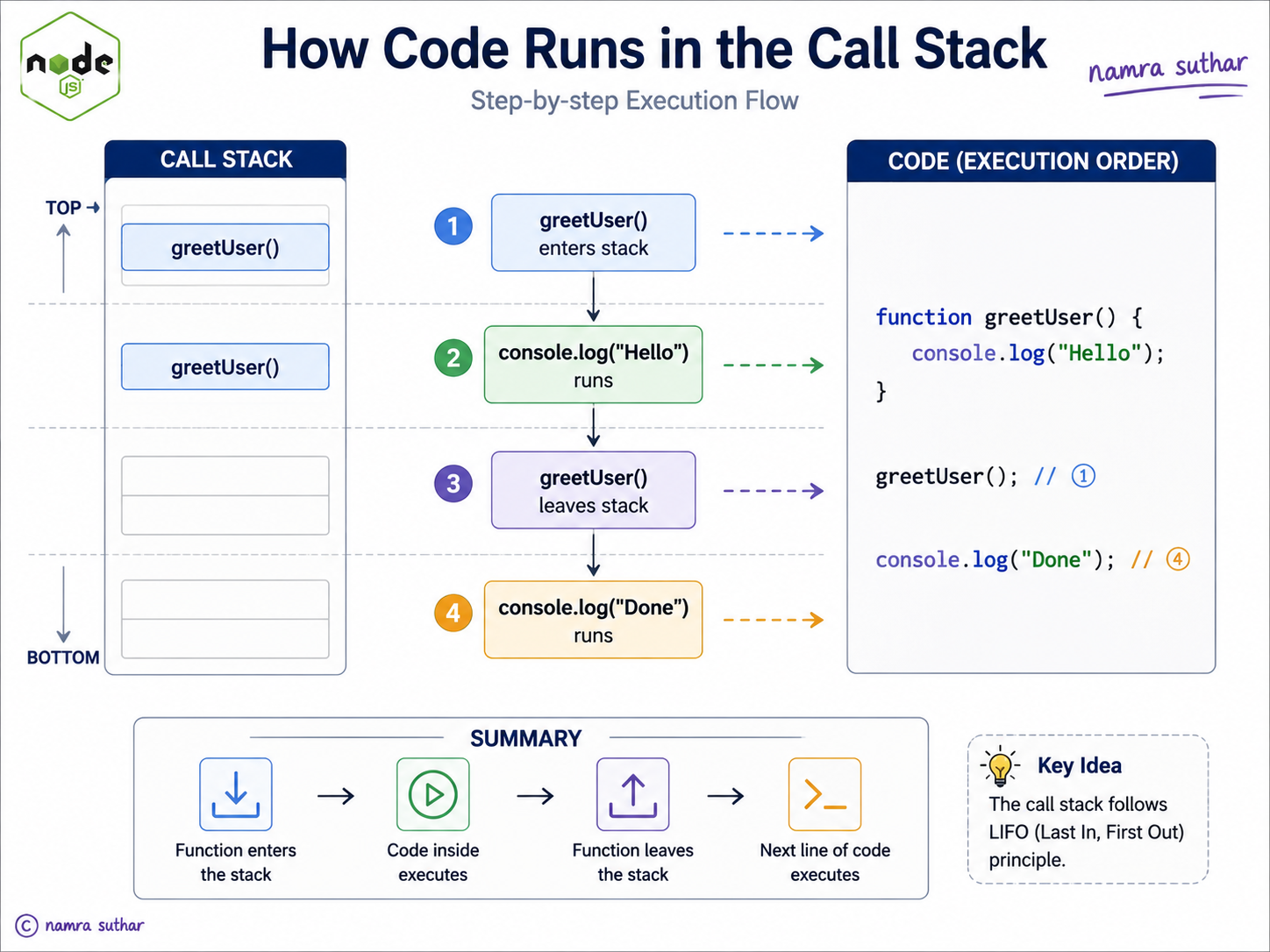
This is simple because everything is synchronous.
But what about slow tasks?
Example:
readFileFromDisk();
getDataFromDatabase();
handleUserRequest();
Some tasks take time.
If JavaScript waited for each slow task directly, the whole program would freeze.
That is the problem Node.js needs to solve.
Why Node.js Needs the Event Loop
Node.js is commonly used for servers.
Servers need to handle many users at the same time.
Imagine this:
User 1 → request data
User 2 → login
User 3 → upload image
User 4 → fetch orders
If Node blocked on User 1’s database request, then User 2, User 3, and User 4 would have to wait.
That would be bad.
So Node.js says:
“If a task takes time, I will start it, move it outside the main flow, and continue handling other work.”
When that async task finishes, the event loop brings its callback back for execution.
That is why Node.js feels fast for many web server tasks.
What Is the Event Loop?
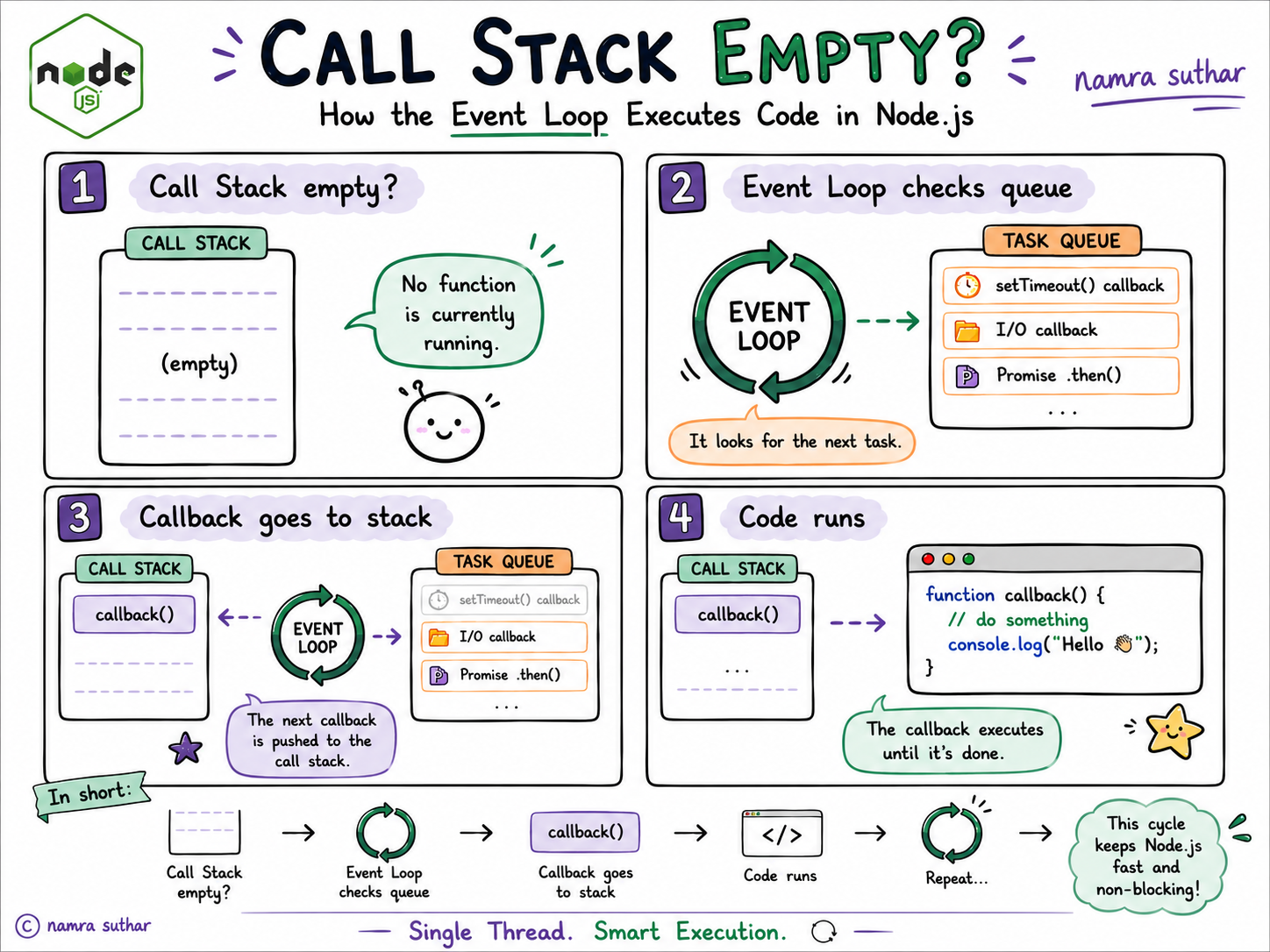
The event loop is a mechanism that keeps checking:
Is the call stack empty?
Is there any completed async callback waiting?
If yes, move that callback to the call stack.
Simple analogy:
The event loop is like a teacher checking a submission queue.
Students submit assignments.
The teacher does not check everything instantly. The teacher checks one by one when free.
Students submit work → Queue
Teacher free? → Take next work
In Node.js:
Async task completed → Queue
Call stack free? → Event loop sends callback to stack
Call Stack vs Task Queue
Let’s keep this conceptual.
Call Stack
The call stack runs your current JavaScript code.
It works like a stack of plates.
Last function added is the first one completed.
Call Stack

| functionC |
| functionB |
| functionA |
If the stack is busy, callbacks cannot run yet.
Task Queue
The task queue stores callbacks waiting to run.
Example:
setTimeout(() => {
  console.log("Timer done");
}, 1000);
After 1 second, the callback does not run magically in the middle of everything.
It waits in a queue until the call stack is empty.
Task Queue

[ timer callback ] [ file callback ] [ request callback ]
Event Loop
The event loop connects both.
Call Stack       Task Queue
    |                |
    |                |
    v                v
 running code     waiting callbacks

        Event Loop checks:
        "Is stack empty?"
When stack is empty:
Task Queue callback → Call Stack → Execute
Simple Event Loop Flow
1. Run normal synchronous code
2. Send async tasks to Node/browser APIs
3. Async task completes
4. Callback waits in queue
5. Event loop checks call stack
6. If stack is empty, callback runs
That is the basic cycle.
Example with setTimeout
console.log("Start");

setTimeout(() => {
  console.log("Timer finished");
}, 1000);

console.log("End");
Output:
Start
End
Timer finished
Why?
Because setTimeout is async.
Flow:
console.log("Start") runs
        ↓
setTimeout starts timer
        ↓
console.log("End") runs
        ↓
timer completes
        ↓
callback waits in queue
        ↓
event loop sends callback to stack
        ↓
"Timer finished" prints
Node does not stop and wait for the timer.
It continues.
What Happens If Stack Is Busy?
Look at this example:
console.log("Start");

setTimeout(() => {
  console.log("Timer callback");
}, 0);

for (let i = 0; i < 1000000000; i++) {
  // heavy work
}

console.log("End");
Even though timer is 0, the output is:
Start
End
Timer callback
Why?
Because setTimeout(..., 0) does not mean “run immediately”.
It means:
“Put this callback in the queue as soon as possible.”
But the callback can only run when the call stack is free.
So if the stack is busy with a heavy loop, the timer waits.
This is a very important beginner point.
How Async Operations Are Handled
When Node.js sees async work, it does not keep the main JavaScript thread waiting.
Async work can include:
timers
file system operations
network requests
database calls
API calls
High-level flow:
JavaScript starts async operation
        ↓
Node handles it in background
        ↓
JavaScript continues running
        ↓
Async work completes
        ↓
Callback goes to queue
        ↓
Event loop runs callback when stack is free
Example:
console.log("Before reading file");

readFile("notes.txt", () => {
  console.log("File read complete");
});

console.log("After reading file");
Expected output:
Before reading file
After reading file
File read complete
The exact function depends on your code, but the idea stays the same.
Node starts file reading, continues running other code, and later executes the callback.
Timers vs I/O Callbacks
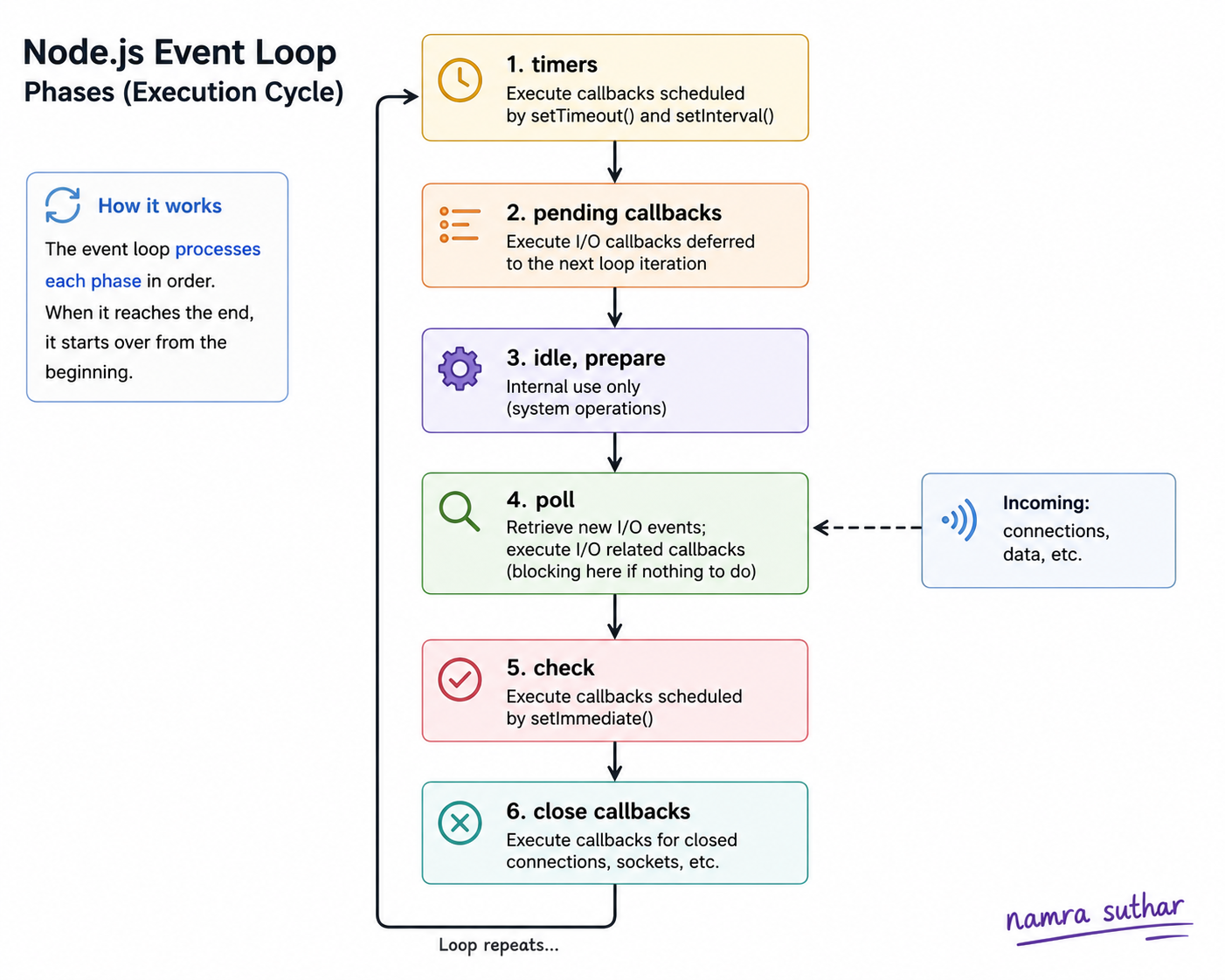
At beginner level, you do not need to memorize all event loop phases.
But you should know this high-level difference.
Timers
Timers are callbacks scheduled using functions like:
setTimeout()
setInterval()
Example:
setTimeout(() => {
  console.log("Run after 2 seconds");
}, 2000);
This means:
“Run this callback after at least 2 seconds, when the stack is free.”
Notice: at least 2 seconds.
Not exactly always 2 seconds.
If the call stack is busy, it may run later.
I/O Callbacks
I/O means input/output.
Examples:
reading a file
writing a file
receiving network data
database response
These callbacks run when that I/O operation completes.
Example idea:
readFile("data.txt", () => {
  console.log("File reading done");
});
Node does not block the main thread while waiting for the file.
It handles the operation and later runs the callback.
Timers vs I/O: Simple Comparison
| Concept | Timer Callback | I/O Callback |
|---|---|---|
| Comes from | setTimeout, setInterval |
File, network, database |
| Runs when | Time has passed and stack is free | Operation completes and stack is free |
| Example | Wait 2 seconds | Read file from disk |
| Key idea | Time-based | Work-completion-based |
Simple memory line:
Timer waits for time.
I/O waits for work to finish.
Role of Event Loop in Scalability
Node.js is popular for APIs, real-time apps, chat apps, and dashboards because it handles many connections efficiently.
The event loop helps Node avoid blocking.
Instead of creating a new thread for every request, Node can manage many requests through async operations.
Example:
Request 1 → waiting for database
Request 2 → handled meanwhile
Request 3 → waiting for file
Request 4 → handled meanwhile
This makes Node.js good for I/O-heavy apps.
Examples:
REST APIs
chat applications
notification systems
streaming apps
dashboards
tools that call many APIs
But there is one important tradeoff.
Node.js is great when tasks are waiting on I/O.
It is not ideal when one task does heavy CPU work on the main thread.
Example:
for (let i = 0; i < 10000000000; i++) {
  // heavy calculation
}
This blocks the call stack.
If the call stack is blocked, the event loop cannot run callbacks.
So for heavy CPU tasks, we usually use other approaches like worker threads, queues, or separate services.
No need to go deep into that now. Just remember:
Node.js handles waiting very well, but heavy calculation can still block it.
Common Beginner Mistakes
1. Thinking Node.js Is Fully Multi-Threaded
Node.js can use background workers internally, but your JavaScript code mainly runs on a single thread.
The event loop helps manage async tasks without blocking.
2. Thinking setTimeout(..., 0) Runs Immediately
It does not run immediately.
It waits until the current synchronous code finishes.
setTimeout(() => {
  console.log("Timer");
}, 0);

console.log("Hello");
Output:
Hello
Timer
3. Blocking the Event Loop with Heavy Code
This is bad in a server:
while (true) {
  // blocks forever
}
If the call stack is busy forever, Node cannot handle other callbacks.
4. Thinking Async Means Faster Always
Async does not mean the task itself becomes faster.
It means Node can do other work while waiting.
Example:
If database takes 2 seconds, it still takes 2 seconds.
But Node does not waste those 2 seconds doing nothing.
5. Going Too Deep Too Early
The Node.js event loop has phases internally.
But as a beginner, first understand:
Call stack
Task queue
Event loop
Async callback
Once this mental model is clear, deeper internals become easier.
Practice Tasks
Try predicting the output.
Task 1
console.log("A");

setTimeout(() => {
  console.log("B");
}, 1000);

console.log("C");
Expected output:
A
C
B
Task 2
console.log("Start");

setTimeout(() => {
  console.log("Timer");
}, 0);

console.log("End");
Expected output:
Start
End
Timer
Task 3
Explain this in your own words:
Why does Node.js not wait for an API response before running the next line of code?
Hint:
Because async work is handled outside the main call stack, and the event loop brings the callback back later.
Event loop = Node.js ka task manager
Stack free? Queue me se next callback lao.
Conclusion
The Node.js event loop helps JavaScript handle async work without blocking the main thread.
It checks when the call stack is free and then runs waiting callbacks from the queue.
Once you understand call stack, task queue, and event loop, Node.js async behavior becomes much easier to reason about.


